Skip to main content
 FreeAgent Update - Estimates have landed

Roan Lavery
CEO, Co-founder
Estimate this
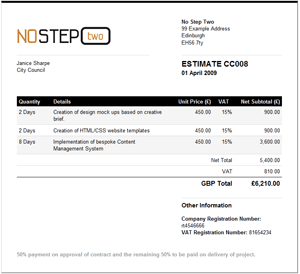
In true user-driven style we recently had a lively discussion regarding the functionality people would like to see from Estimates. Workflow, one-click conversion to invoices, audit trail and combining multiple estimates on a single invoice were all requests that, I’m glad to say, have seen it into the first release.
Creating an estimate is very similar to invoicing. You create a new Estimate within the Work section. The first difference you’ll notice is the Type option. This lets you decide how you would like to label your Estimate. For most people this will be a purely semantic decision but for others it will tie into a workflow process.
Like invoices, you can optionally associate an estimate with a project, which is handy if you want to combine multiple estimates on a single invoice later.
Once the estimate has been created, you add estimate items and send to the client by email or print off the pdf.
If you need to make any changes to the Estimate you can change its status back to Draft and update details or the amounts, before resending to the client.
Make History
The status of an estimate has additional options for Mark as Approved, Mark as Rejected and Converting to Invoice.

FreeAgent tracks the history of any estimates as you create them, change status and send to clients. Beneath the estimate preview you’ll see a History Table which lists important milestones in that estimate’s life, such as when it was sent to the client, when it was approved etc.
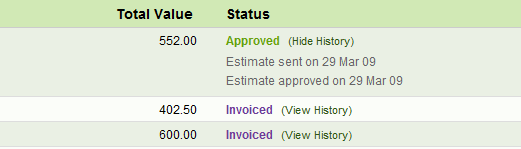
A mini version of this is also displayed on the main estimates screen where you can expand the history for any estimate.
Workflow that works
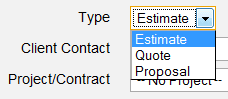
If you have a multi-step process for the delivery of estimates and quotes to your clients you should appreciate the simple workflow features we’ve built in. We’ve kept this as open and flexible as possible, so we don’t enforce anybody down a particular path, but if you do distinguish between estimates, quotes and proposals then you can change the Type at any time and resend to the client.
The History Table of the estimate tracks this so you can see the status of your estimate as it moved through the various stages.
Converting to Invoices
Converting estimates to invoices can happen in two ways:
- A one-click conversion from the Estimate view screen which will create a new Invoice with the same contact details and items as the Estimate.
- If you need to create an Invoice from multiple Estimates you can select the Add Unbilled Estimates option from the Invoice creation screen. This will create invoice items from all unbilled estimate items associated with a project, so you will need to associate the Estimates with the project in the first instance if you want to do this.
Estimate Overview Panel
The cherry on the cake is a new Recent, Open or Approved Estimates panel on the Overview screen which brings all recent estimate activity together.
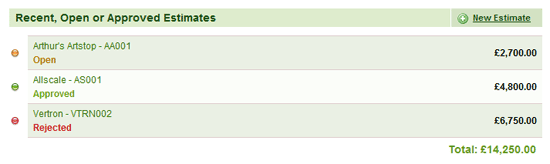
This is disabled by default but you can enable it from the Customize Overview drawer.
But why stop there
We managed to squeeze these mini-updates in too:
- The Projects list table now displays totals for Amount Invoiced and To Be Invoiced.
- The Contact Cards and table now only display Active Projects so it’s a bit more manageable
- Your company name has now been added as a prefix to invoice and estimate pdf filenames.
- We now allow negative expense amounts to represent refunds
- We’ve fixed an issue with the calculation of Class4 NICs on partnership income
- We’ve fixed an issue with the VAT calculation of subscription income
- We now support European Paypal statement format
- We also support the ABN Amro electronic bank statements
All the best,
Roan & The Team at FreeAgent Central.