Skip to main content
 The all new FreeAgent

Roan Lavery
CEO, Co-founder
If you’ve been following us on Twitter, you’ll know this has been a while in the making. Today we relaunch the new FreeAgent Central website, and it’s bigger and better then ever, with more resources for new and existing users.
We’ll let you dig around yourself, but be sure to take a look at the improved Support section where we now have a Knowledge Base of articles and tutorials to help you get the most out of FreeAgent, and a new Business Blog which will focus on money, tax and finance tips supplied by people in the know.
We’ll be adding to this over the coming weeks, so if there’s anything specific you’d like to see, let us know. We are, as always, at your humble command.
New look FreeAgent
But it’s not just the website that’s had a sexy new facelift, the application has also been given an overhaul to drag it once again to the cutting edge of web fashion.
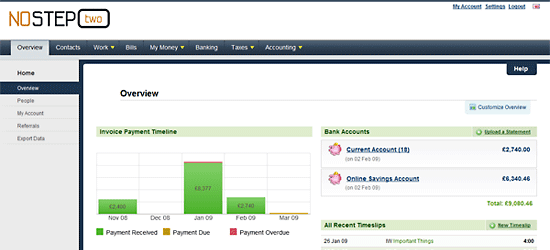
The new interface is designed to be easier on the eyes, especially for those prolonged periods of use around tax time! It’s not just good looks though, as we’ve restructured the top level navigation to make it more intuitive, and allow us to add new features in the coming weeks.
New Work section
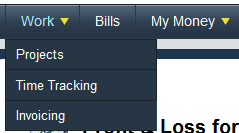
The big change is that Projects, Time Tracking and Invoices have been now consolidated together into a single Work section, cutting down the previously cumbersome top level navigation.
Within these sections you’ll notice subtle improvements here and there, but we’ve kept the core design and functionality the same. Well, if it ain’t broke…
The Time Tracking section however has been reworked and we’ve removed the clumsy calendar in the side column and replaced it with a new Timeslip Control bar.

The control bar lets you select a date from a pop up calendar to show a week’s worth of timeslips below. As with the old calendar, days with timeslips are highlighted in green, and you now have the option of switching from the default week view to a single day view. Handy if you fastidiously log every minute of the day for your projects.
Better Timesheet Reporting

Those of you that need more flexibility in your timesheet reporting will be pleased to hear that there’s…er…now more flexible timesheet reports!
Select from a series of drop downs for date range, including sensible presets and custom date range options, projects, contacts, users and tasks to generate your report.
Reorder Invoice Items
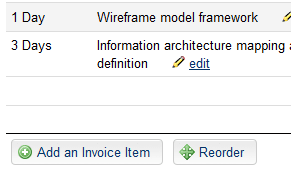
You can now drag and drop your invoice items in any draft invoice to reorder these as you see fit.
Just select the Reorder button at the foot of the invoice amount table and then drag the individual invoice items to the desired position. When your finished, select I’ve finished reordering and you’re done. Simple!
Other updates in brief
Also, in this release:
- UK Limited Companies will see a new My Money section which deals with personal expenses, dividends, salary and payroll. Sole Traders will simply see Expenses as a top level section
- Personal and Business taxes are now found under the Taxes section for all UK companies
- We’ve updated the Expenses table to allow you to view by Month, Tax Year, Future Upcoming or Recurring
- Misc Income Receipts becomes Other Sales Income, and joins advertising income and subscription income in the turnover section of Profit and Loss
- There is a new feature in Payslips to allow you to account for student loan deductions
It’s the little things. There’s nothing bigger.
Looking forward
By all accounts this is a big release for us, but in many ways it’s simply laying the foundations for what’s to come. Over the next few releases we’ll be making even more significant improvements to how FreeAgent works, and adding some oft-requested new features. So if you’ve been patiently waiting for Estimates then your patience won’t have to hold out much longer!
We’d also like to say a huge thank you to all the users who contributed to FreeAgent over the past few weeks, either by submitting a testimonial for the new website or beta testing the new design. You truly are the wind beneath our wings and we appreciate your ongoing support immensely.
Best wishes,
Roan & The Team at FreeAgent Central.