Skip to main content
 Year one of MTD for Income Tax: a step-by-step guide

Making Tax Digital (MTD) for Income Tax means a whole new way of reporting income and costs to HMRC for sole traders and landlords. If you had qualifying income totalling over £50,000 in 2024/25, MTD is mandatory for you from 6th April 2026. If you had lower qualifying income, you can also voluntarily sign up to join MTD.
This guide is for all sole traders and landlords who have signed up for MTD for Income Tax in the first wave - whether because you have to, or because you want to get ahead of the game.
To help you get your head around what you need to do and when, we’ve plotted out the first round of MTD for Income Tax - starting from April 2026 and taking you all the way through to your very first ‘final declaration’ before the end of January 2028. (Eagle-eyed readers will note it’s actually going to take a little bit more than a year to bed in. Don’t worry, we’re here to help you get it done.)
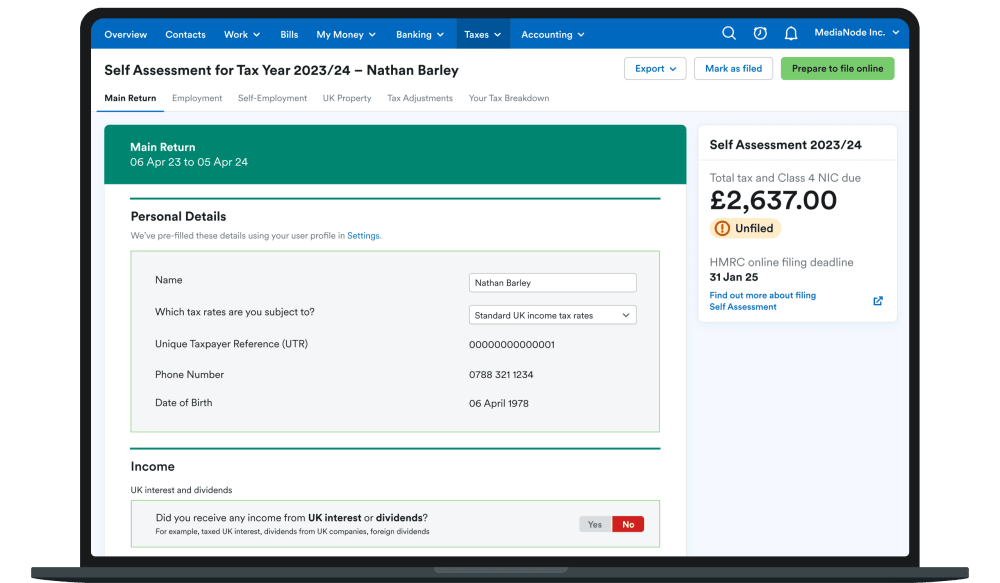
We’ll take you through the deadlines for that first period, and how MTD will interact with the Self Assessment process you’ve been used to in the past. So you can picture exactly what it’s going to look like, we’ve also included snapshots from FreeAgent’s easy-to-use, MTD-compatible, HMRC-recognised software.
Be aware that if you have more than one income stream, for instance if you are a sole trader and you also rent out property, then you’ll need to file quarterly updates and an end-of-year submission for each income stream, as well as one final declaration for all of your income together. That means you will need to follow most of these steps twice.
FreeAgent has created a downloadable Google calendar, with all the key MTD dates marked on it, to help you stay on track. To download the calendar click here, accept the ‘save’ prompt, and it will add MTD key dates to your own Google calendar.
Before 6th April 2026: Register for MTD for Income Tax with HMRC and sort out your software
If your qualifying income for 2024/25 was over £50,000 you will have to join Making Tax Digital for Income Tax before 6th April 2026 and start keeping digital records for your business from that date.
Step 1: Manually register for MTD for Income Tax on your HMRC account
HMRC will not do this automatically for you - so dig out your Government Gateway login details and follow the online registration process.
Note: Don’t think you might just not bother registering: MTD for Income Tax is mandatory, and there will be penalties for not complying or failing to keep digital records. You have to use MTD for Income Tax, unless you meet the very limited criteria for an exemption. If you think you may be exempt, for example because you can’t use the internet, you must apply for exemption to HMRC before the date you are required to start using MTD for Income Tax.
Step 2: Ensure you have MTD-compatible software to keep your digital records
You can check HMRC’s list of recognised software here.
Note: You can get FreeAgent’s HMRC-recognised accounting software free, if you have a business current account with NatWest, Royal Bank of Scotland or Ulster Bank, for as long as you retain the account. You can also get FreeAgent free of charge if you have a Mettle bank account and make at least one transaction a month. (Optional add-ons may be chargeable.)
Step 3: Connect MTD-compatible software to your HMRC account
This is another step you have to do manually. If you’re using FreeAgent, you can do it through the ‘Connections & Add-Ons’ menu.
6th April 2026: MTD for Income Tax record-keeping starts
It’s the big day. Anyone with qualifying income of over £50,000 must start keeping their records in accordance with the rules of MTD for Income Tax. This means using your HMRC-recognised MTD-compatible software to keep fully digital records, so you’re ready to send quarterly updates to HMRC through the year and file a final declaration after the end of the tax year.
Time-saving tip: Self Assessment filing for 2025/26 opens on 6th April 2026. So, to avoid extra admin of doing Self Assessment when you’re also busy with MTD, file it as soon as you can after this date. If you get your Self Assessment out of the way before your quarterly updates begin for MTD for Income Tax in August 2026, that will avoid overlap between Self Assessment and MTD. Filing Self Assessment early means you’ll have one less thing to worry about.
7th August 2026: Deadline to send your first quarterly update
The addition of quarterly updates is a fairly big change, and it’s one that’s got many people worried about increased admin burden. For each quarterly update, HMRC will ask you to submit your income and costs for a period covering three months.
However, if you have connected your FreeAgent account to HMRC before 6th April (and have been keeping on top of your regular admin), making the submission should be relatively simple. Just double-check your figures for the quarter and send them to HMRC once you are as sure as you can be that your figures are correct.
In FreeAgent the sending process just means pressing the green ‘Send update’ button on the relevant page. All being well, in around a minute you’ll have filed your quarterly update to HMRC.
Note: You can also view upcoming quarterly update deadlines on the FreeAgent mobile app.
The periods covered by your quarterly updates will automatically default to the HMRC tax quarters (e.g. 6th April to 5th July, 6th July to 5th October). But you can choose to switch to calendar quarters instead, if that better suits your bookkeeping calendar.
Note: You won’t be asked to pay any tax when you submit your quarterly updates. The annual payment deadlines for income tax and Class 4 National Insurance remain 31st January and 31st July.
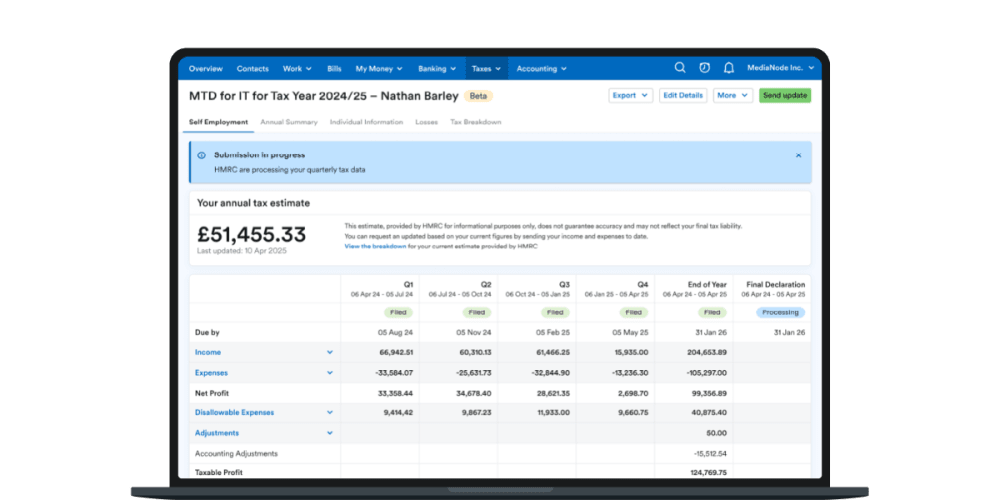
HMRC has confirmed that sole traders and landlords who are mandated to start using MTD for Income Tax in April 2026 will not face penalties for late submission of their first four quarterly updates. There will be penalties in future, however, so it’s best to get into the habit of hitting those deadlines from the beginning.
While it might seem like a lot to start with, keeping on top of paperwork through quarterly updates should ultimately make filing your tax return easier, according to Craig Ogilvie, HMRC’s Director of Making Tax Digital. “Don’t see it as more work,” he urges. “You’re doing your tax in bite-sized chunks. You still complete [a tax return] at the end of the year, but it will be easier than it was before. So think of it as doing the work through the year so you’ve got less to do at the end of the year.”
7th November 2026: Deadline to send your second MTD for Income Tax quarterly update
Hopefully, you’ll be feeling ready to go this time - check your figures and press the green button!
If you forgot something or made a mistake in your first quarterly update, you can make a correction after it is sent, and that correction will upload with this second quarterly update.
31st January 2027: Deadline to file your Self Assessment tax return for 2025/26 and pay any tax due
Even though you are using MTD for Income Tax, you will still also have to file a Self Assessment return to cover the 2025/26 tax year. The good news is that this will be your final Self Assessment tax return.
Note: 31st January 2027 is also the deadline for your first payment on account for the 2026/27 tax year.
7th February 2027: Deadline to send MTD for Income Tax quarterly update three
Get those figures checked and send your quarterly update, as before.
7th May 2027: Deadline to send your fourth MTD for Income Tax quarterly update
By this point those quarterly update submissions will hopefully be a piece of cake!
31st July 2027: Deadline to pay your second payment on account for 2026/17 tax year
Don’t forget your payments on account for 2026/27 - this is the final deadline for your second payment.
7th August 2027: Deadline to send your first MTD for Income Tax quarterly update for 2027/28
You’re now starting year two of your quarterly update submissions for MTD for Income Tax.
Don’t forget: penalties will now be applied if quarterly update submissions are late. It is only your first four MTD for Income Tax quarterly updates starting from April 2026 which were not subject to late submission penalties.
7th November 2027: Deadline to send your second quarterly update for 2027/28
This is your second quarterly update in year two of MTD for Income Tax. Remember, if you have corrected or updated any inaccuracies or omissions on previous quarterly updates, these pull through to HMRC when you submit each new quarterly update.
31st January 2028: Deadline to submit your MTD for Income Tax end-of-year submission and final declaration, and pay your tax for 2026/27
You will need to make an end-of-year submission for each income stream. That should include adjustments, such as capital allowances and any goods you’ve taken for your own use. Then, the final declaration you submit as part of MTD for Income Tax will be your total figures for the 2026/27 tax year, the same as a Self Assessment tax return was in previous years.

You must ensure your digital records and quarterly updates are up to date and accurate before you complete your final declaration. The final declaration includes full information about all of your taxable income, such as interest on savings, and dividend payments.
If you make a mistake in your final declaration, don’t worry, you can file an amended version once you discover the error. Corrections must be made to HMRC within 12 months of the filing deadline. Inaccuracies in your final declaration which are not corrected may incur penalties.
You can also be charged penalties for late payment of any tax or National Insurance (NI) you owe. As with Self Assessment, 31st January is the deadline to pay your tax and NI bill under MTD for Income Tax, with any payments on account being due by 31st July.
Now you’ve seen the details, don’t forget to download FreeAgent’s free Google calendar so you don’t need to worry about missing a deadline.
FreeAgent has everything you need to get MTD done
FreeAgent is an all-in-one, HMRC-recognised solution for MTD for Income Tax. We’re here to help you get MTD done, with easy-to-follow guides and award-winning support.
Disclaimer: The content included in this blog post is based on our understanding of tax law at the time of publication. It may be subject to change and may not be applicable to your circumstances, so should not be relied upon. You are responsible for complying with tax law and should seek independent advice if you require further information about the content included in this blog post. If you don't have an accountant, take a look at our directory to find a FreeAgent Practice Partner based in your local area.